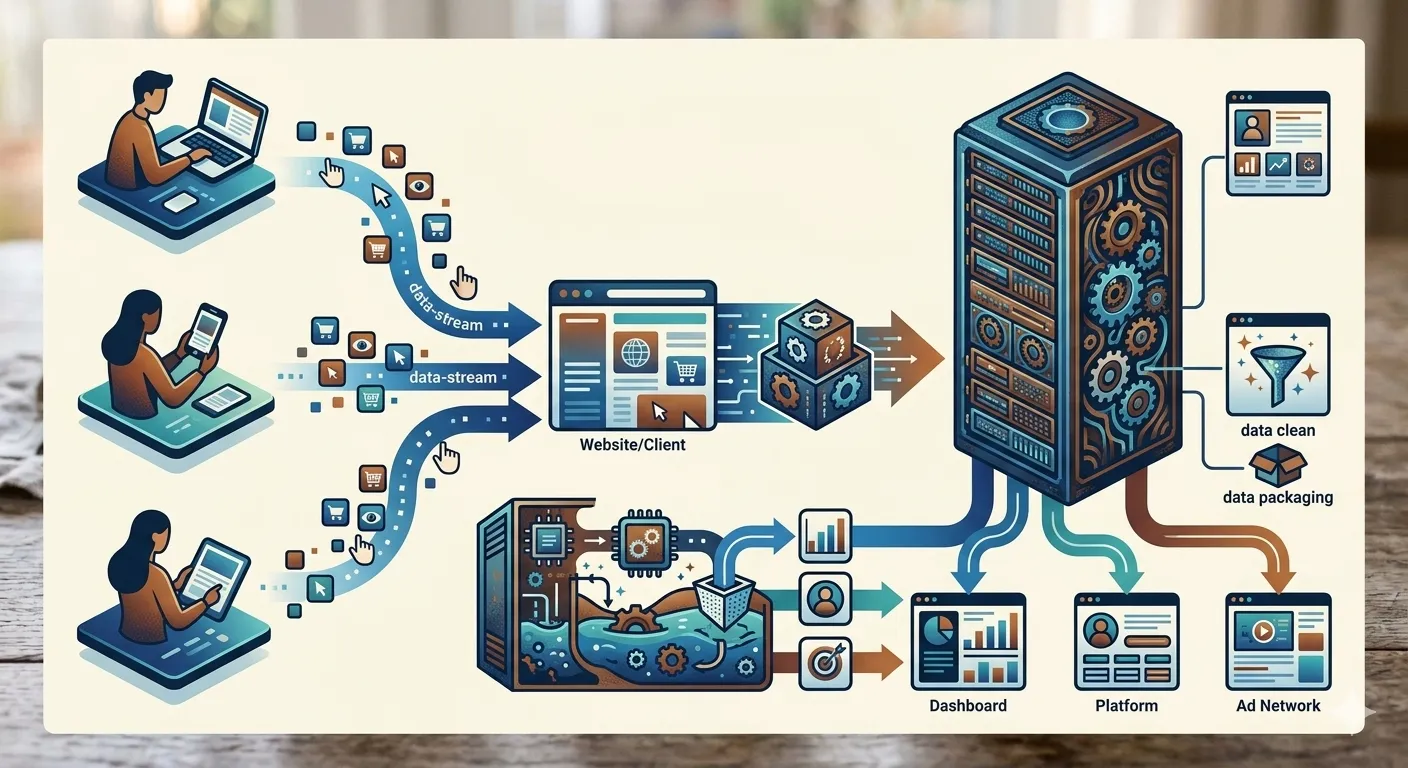
Traditionally, digital analytics has relied on client-side tracking. When a visitor loads your website, their web browser has to download, run, and manage dozens of tracking scripts from various external marketing and analytics vendors. The user's browser does all the heavy lifting—gathering behavior data and sending it off to different platforms. While this approach worked for years, it now introduces serious risks to website performance, data accuracy, and user privacy.
The Cost of Legacy Client-Side Tracking
Relying on the user's browser to collect data has become a major bottleneck for both marketing performance and technical infrastructure. This model creates three distinct problems that impact both your conversion rates and your security posture:
- Slower Page Speeds: Every marketing pixel or tracking script added to your website acts as a performance tax. These heavy files slow down page load times, which directly frustrates users, lowers your conversion rates, and hurts your organic search engine rankings.
- Broken Customer Journeys: Modern browsers (especially Safari with Intelligent Tracking Prevention) aggressively block or delete cookies set by third-party scripts, sometimes within 24 hours. For marketers, this means returning customers look like brand-new visitors, ruining your attribution models and long-term data tracking.
- Security and Compliance Risks: When you let third-party scripts run freely inside a user's browser, you lose control over what data they can see. This creates a data leakage risk, making it incredibly difficult for IT teams to guarantee compliance with strict privacy laws like GDPR or CCPA.
"For marketing teams, server-side tracking isn't just a technical upgrade; it's the only way to rescue your attribution data from browser privacy blocks and keep your website running fast enough to convert visitors."
The Shift to Server-Side GTM as an Enterprise Proxy
Transitioning to Server-Side Google Tag Manager (sGTM) fundamentally changes how you collect data. Instead of forcing the user's browser to talk to multiple marketing platforms at the same time, the browser sends just one clean, secure stream of data to a cloud server that your organization owns and controls. Acting as a gateway, this server cleans, filters, and enriches the data before routing it to external partners.
Table 1: Client-Side vs. Server-Side Data Collection
| Feature | Client-Side Tracking (Old Way) | Server-Side Tracking (New Way) | The Business Benefit |
|---|---|---|---|
| Website Speed | Slower (The browser runs dozens of external tracking scripts) | Faster (The browser sends just one streamlined data stream) | Better user experience, higher conversion rates, and stronger SEO |
| Data Control & Privacy | Low (Third-party scripts can access sensitive browser data directly) | Absolute (You decide exactly what data leaves your server) | Full compliance with privacy laws and zero accidental data leaks |
| Cookie Lifespan | Short (Browsers delete client-side cookies within 1–7 days) | Long (Cookies are written as true first-party cookies from your domain) | Accurate multi-touch attribution and reliable returning-user data |
| Security (API Keys) | Exposed (Private database keys are visible in the website's public code) | Hidden (Private keys stay securely inside your cloud server) | Zero risk of hackers intercepting your marketing API keys |
How Server-Side Tagging Benefits Your Business
Moving the data collection process off the user's device and onto your own secure server provides major advantages for both marketing and IT departments:
- Total Data Sovereignty: With sGTM, your team owns the pipeline. You can scrub out sensitive information—like internal profit margins, customer database IDs, or personal email addresses—before sending data to third parties.
- Optimized Site Performance: Removing bloated tracking codes means the browser has less work to do. A faster, more responsive website leads to lower bounce rates and immediate revenue protection.
- Accurate Attribution: Because sGTM runs on your primary web domain, browsers recognize its cookies as trusted, first-party data. This keeps your analytics intact and ensures your ad campaigns are optimized using high-quality information.
"From an IT perspective, client-side tracking is a security blind spot. Shifting to a server-side proxy acts as a firewall for your customer data, ensuring no unapproved third-party code ever runs in your users' browsers."
The Roadmap to a Successful Setup
To get the most value out of your server-side setup, your marketing and IT teams should collaborate on two foundational steps:
- Standardize the Data Layer: Build a clean, vendor-neutral data layer on your website. This ensures that a single event (like a purchase) is captured once, allowing the server to automatically translate it into the different formats required by Google, Meta, or other ad platforms.
- Set Up Pipeline Monitoring: Websites are constantly changing. Setting up automated alerts and health checks ensures that if a tag breaks or data stops flowing, your team can fix it immediately before it impacts your reporting or ad delivery.
Reclaiming the Data Pipeline
Adopting Server-Side Google Tag Manager is a proactive move to protect both your website's performance and your business intelligence. By taking data collection out of the unpredictable browser environment and putting it into a controlled cloud server, you safeguard user privacy, speed up your website, and secure the clean data needed to make smart, profitable decisions.